
Continue Using Your Course Desktop Post-Completion
One convenient aspect of DaDesktop is that attendees can seamlessly keep working on their course machine for practice even after the course concludes. Before the course wraps up, participants receive an email asking if they'd like to retain access to their desktop machine post-course.
Typically, a participant's course desktop is deleted shortly after the course finishes. Should you want to preserve your desktop for lab practice, you have the option to clone your course desktop into a 'Standalone Desktop' for future use.
To do this, simply go to your Course and Desktop machine, then click the 'Use desktop after course' button next to your machine.
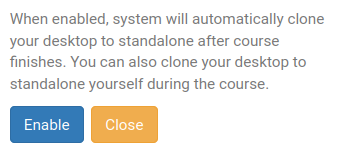
Then, DaDesktop will walk you through the straightforward process and let you 'Enable' this feature.
After enabling, you'll see the following indicator appear next to your course machine

Once the course ends, you can reach your Standalone machine by selecting the Standalones menu at the top of your screen.
Inactive standalone machines that remain unused for a month are automatically removed; however, we send a notification email beforehand to give you sufficient warning, allowing you to extend usage if desired.
Additionally, refer to this page for information on how to manage the retention of your Standalone machine.